

The IDEAL one page to make practical work accessible, engaging and impactful for all
Teaching practical chemistry – especially to learners with lower previous attainment, or those with specific learning needs – can be challenging. Exam board methods are often text heavy, and many students struggle to follow written instructions even after teacher modelling. To build students’ confidence and deepen their understanding of practical work, we need to simplify the process and make each step more accessible.
That is where IDEAL (Identify, Describe, Explain, Analyse, Link) sheets can help. They can improve engagement in all chemistry classrooms. I first came across IDEAL sheets on X (formerly Twitter), when science teacher Adam Higgins shared them as a resource for revising required practicals. Although Adam is no longer active on X, he continues to share resources on LinkedIn and has kindly allowed me to share my own version of his original idea.
That is where IDEAL (Identify, Describe, Explain, Analyse, Link) sheets can help. They can improve engagement in all chemistry classrooms. I first came across IDEAL sheets on X (formerly Twitter), when science teacher Adam Higgins shared them as a resource for revising required practicals. Although Adam is no longer active on X, he continues to share resources on LinkedIn and has kindly allowed me to share my own version of his original idea.
What are IDEAL sheets?
IDEAL sheets are one-page practical guides that you can use during and after practical work. I find that practicals are most effective when I explain concepts alongside the observation stage, following the slow practical method advocated by key voices in science education such as Adam Boxer. IDEAL sheets complement this approach by helping students actively engage with each stage of the experiment while improving their ability to record data and explain methods accurately. I use them for all practicals and find them particularly useful for my foundation classes. Since using them, I’ve seen my students become more confident answering exam questions on methods and data analysis.
IDEAL sheets are one-page practical guides that you can use during and after practical work. I find that practicals are most effective when I explain concepts alongside the observation stage, following the slow practical method advocated by key voices in science education such as science teacher and author Adam Boxer (rsc.li/46nSXZZ). IDEAL sheets complement this approach by helping students actively engage with each stage of the experiment while improving their ability to record data and explain methods accurately. I use them for all practicals and find them particularly useful with my foundation classes. Since using them, I’ve seen my students become more confident answering exam questions on methods and data analysis.
How do you use them?
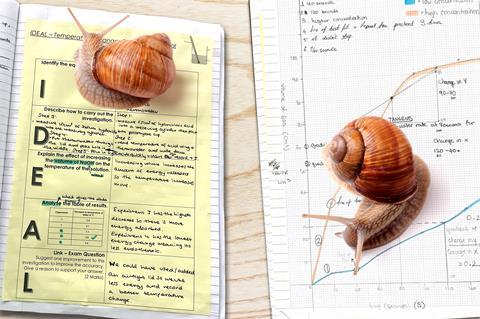
IDEAL sheets are flexible and easy to make. You can see an example of a completed sheet in the image above, and download an editable template from this article.
IDEAL sheets are flexible and easy to make. You can download an editable template for a sheet from the Education in Chemistry website: rsc.li/4kkMdlB
Once you’ve distributed the sheets, learners fill in the boxes as follows:
I Identify
In this box, students identify the equipment required for the practical. They collect their equipment, fill in the sheet, then arrange their equipment to mirror your setup. I then get learners to complete the practical as a class using the ‘I do, you do’ approach.
D Describe
In this box, learners describe, step by step, how to perform the practical.
There are two options here. If the practical includes wait times, I ask students to write down the steps they’ve just completed so the whole method is written down by the end of the practical. This is great for recalling method steps. While they do this, circulate and ask questions to check the accuracy of their recall.
No wait time? Get learners to fill in this box at the start of our next lesson as a retrieval practice activity. Students then self-assess their method using a model example or another student’s version shown under the visualiser. You can gauge understanding by asking students to justify each step and evaluate any errors they’ve made or uncertainty they have.
E, A and L Explain, Analyse and Link
These boxes assess students’ understanding of the practical. In the Explain box, students must explain something related to the practical, such as an observation or the reason for a certain step of the practical. In Analyse, students analyse a piece of data, such as table of results or a graph. In Link, learners answer a short exam question worth two or three marks.
I usually ask students to fill in these boxes as an independent task after the practical, during wait times or as homework.
Data recording and analysis
As well as filling in the sheet, students prepare tables in their books before starting the practical and fill them in as they collect data. Graph drawing and conclusion writing happen in the next lesson, regardless of when students fill in the D box. The result is back-to-back pages showing how students’ skills progress.
Why do IDEAL sheets work?
Why do they work?
Students see the task as just one sheet of paper to complete, increasing participation and engagement and lowering cognitive load. You can customise the sheets for any practical at any key stage. I’ve even added QR codes that take students to practical videos, to help them revise for exams. You can print your sheets in a different colour, making them easy to spot in students’ books.
As with all classroom strategies, effective behaviour management and consistent routines are effective for success. By embedding the slow practical method first, then introducing IDEAL sheets, you can maximise impact and understanding in your lab and classroom.
Feel free to contact me with any questions on X (@STEMyBanda) and on LinkedIn.
Thandi Banda
Downloads
IDEAL example sheet
Handout | PDF, Size 0.1 mbIDEAL example sheet
Editable handout | Word, Size 0.45 mb

![shutterstock_1916933567 [Converted]-01](https://d1ymz67w5raq8g.cloudfront.net/Pictures/159x106/4/2/1/525421_shutterstock_1916933567converted01_876477.jpg)





No comments yet