

Boost your learners’ graph skills with these tips on terminology and annotations, visualisers and talk
Every science student needs a range of graph skills. These include:
- plotting
- interpreting
- understanding context – relating the physical world to the graph and vice versa.
Although students cover graph skills in maths, there are differences between how and why graphs are used in maths compared to science. Knowing how to approach graph skills in chemistry is an invaluable teaching skill. Therefore, science teachers need to be equipped to teach these skills from their own context and perspective. Here are some ideas that I’ve found work well when teaching graph skills in a science lesson.
Although students cover graph skills in maths, there are differences between how and why graphs are used in maths compared to science. Knowing how to approach graph skills in chemistry is an invaluable teaching skill (rsc.li/4hSKZ1n). Science teachers therefore need to be equipped to teach these skills from their own context and perspective. Here are some ideas that I’ve found work well when teaching graph skills in a science lesson.
Terminology differences
In science lessons, correlation can mean any data that appears to have any relationship, but in maths, a positive correlation must pass through (0,0) and negative correlation means a straight slope downwards (see below).
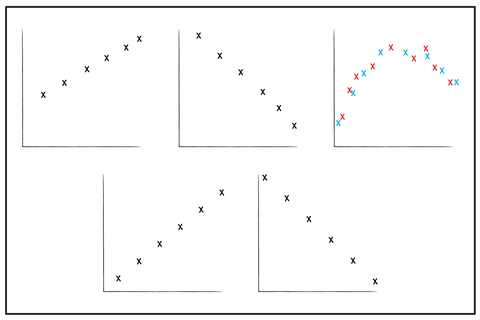
Be open and clear about differences between approaches – it is not that one subject is right and the other wrong, they are just different.
The power of the visualiser
While this is definitely not a new idea, it is a tried-and-tested one. As a newly-minted head of science in 2011, I asked our school to buy bendy-necked Hue HD webcams for all our labs. These precursors to the modern visualiser were transformational, enabling the whole class to engage in graph skills lessons.
I use the visualiserto teach all manner of graph skills: choosing sensible axes, plotting points accurately and analysing slopes, for example. I have found that, by talking through my decisions and techniques as I draw the graph, the quality of student work is higher than if I had not demonstrated it first.
I use the visualiser to teach all manner of graph skills: choosing sensible axes, plotting points accurately and analysing slopes, for example (rsc.li/4dxKTcP). I have found that, by talking through my decisions and techniques as I draw the graph, the quality of student work is higher than if I had not demonstrated it first.
A visualiser is also extremely powerful for enabling whole-class discussions. Choose a student’s graph that is generally good but has one or two minor things that can be improved. For example, when the scale has been chosen so that the graph takes up less than half the page. Once shared via the screen, whole-class discussions can be tight and effective. Begin by highlighting some positives on the graph and ask students to say if they can spot anything that can be improved – a correction is nearly always suggested (sometimes by the student who drew the graph). Following these discussions, students can either correct their graphs or write down what they need to do next time to improve.
Discover more support for teaching maths skills in science
- Help learners interpret graphs with this diagnostic exercise and cooling curves practical.
- Use our lesson resources to build learners’ skills and confidence in how to draw graphs in science.
- Find all our maths resources and articles in our maths skills for chemistry collection.
Annotate graphs to boost understanding
Once students have drawn their graphs, I frequently take a good example and annotate over it under the visualiser, highlighting the key aim(s) of the lesson.
Annotate for understanding
Once students have drawn their graphs, I frequently take a good example and annotate over it under the visualiser, highlighting the key aim(s) of the lesson (rsc.li/4ewKbwL).
I might add:
- calculations, such as changes in a variable, unit conversions or slope analysis
- diagrams, descriptions and explanations to link the graph back to the original concept
- horizontal lines and vertical lines when taking readings
- shading for a particular area of a graph.
Adding text and/or diagrams to graphs helps develop student understanding and make them more memorable.
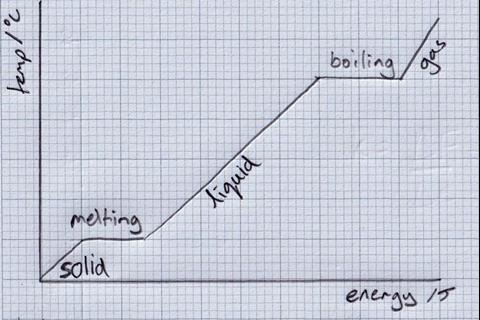
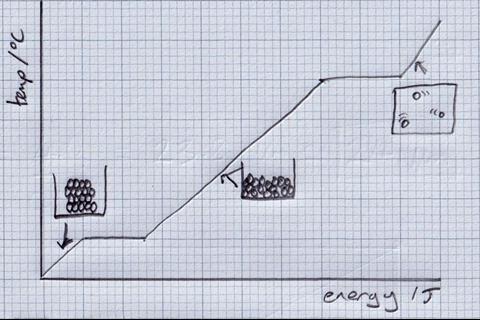
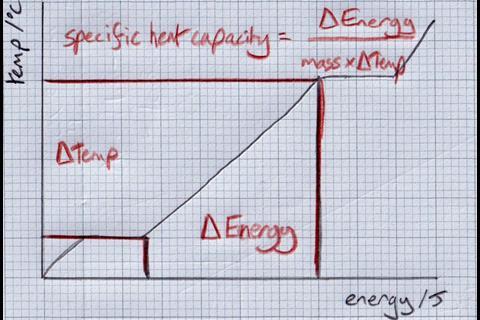
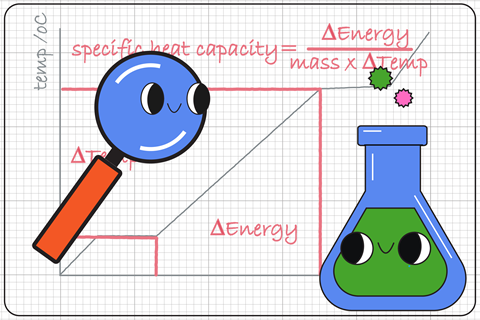
Above, the same heating graph is used in multiple ways to highlight key ideas. Once I have demonstrated this annotation process, I then ask students to do the same to their graphs.
Before writing on their graphs, many students benefit by discussing what they’re going to write in groups of two or three. This can improve confidence and may reduce mistakes.
Oracy tips
- When annotating graphs, ban the word ‘it’. Don’t allow students to say or write ‘it increases’; they must be clear about what is physically changing e.g. ‘the temperature increases’.
- During graphing lessons, we can help students develop exam technique by asking them to separate out ‘describe’ (based on the graph) from ‘explain’ (linked to the theory):
| Describe | Explain |
|---|---|
|
Between 0 and 40 seconds, the volume of gas increases rapidly … |
… because reactant concentrations are high and collisions happen frequently. |
We must remember why we ask students to plot graphs in science. It’s not to provide a lasting record of some new and original work – we use graphs to help students learn, understand and remember. By adding detail onto graphs, students engage more deeply with the data.
I encourage all science departments to bring their teachers together to discuss how best to teach graph skills. Begin by agreeing the purpose of student graphs, before considering the most effective teaching methods for each necessary skill.
Alan Denton









No comments yet